Printable Mazes: Free Mazes to Print
Pick a difficulty, choose how many mazes per page, then print or save a PDF. Answer pages are included.
Recent
Your last 10 settings, saved only in this browser. Nothing is uploaded.
Printable mazes are paper puzzles with a Start, a Finish and a route between them, and this free tool creates them for you in your web browser. There is no sign-up and nothing to install. Each maze is made on your own device, and nothing is uploaded.
Choose one of six difficulty levels, from Very easy for small children to Expert, and print as many mazes per page as you need. You can add a title, number the mazes, add Start and Finish labels, and print an answer page with the route drawn in red. The Worksheet layout adds a name and date line, which suits classroom or home use.
Mazes can be rectangles, circles or shapes such as a Christmas tree or dinosaur. Every maze is built from a seed, so you can return to the exact same puzzle later.
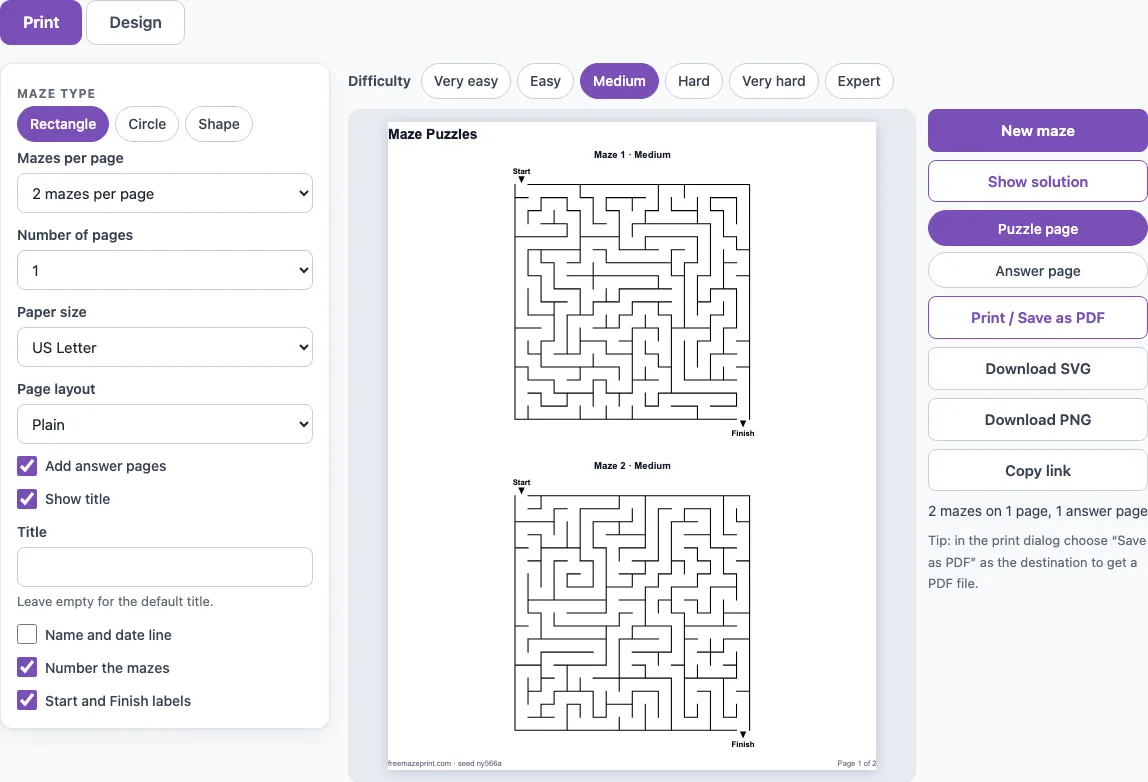
How to use the Printable Maze Generator
The page opens on the Print tab with Medium rectangle mazes, two per page.
- Click a difficulty button above the preview: Very easy, Easy, Medium, Hard, Very hard or Expert. The preview changes straight away.
- Set Mazes per page to 1, 2, 4 or 6, and Number of pages to a value from 1 to 20.
- Choose Paper size: US Letter or A4.
- Pick a Page layout. Plain gives a clean page. Worksheet adds a Name and date line and the instruction “Find the way from Start to Finish.” It offers 1, 2 or 4 mazes per page.
- Tick the extras you want: Show title, Number the mazes, Start and Finish labels and Add answer pages.
- Check the preview of page 1, or of the answer page.
- Click Print / Save as PDF. Choose Save as PDF as the destination in the print dialog if you want a file.
The Design tab changes the size, the maze type and more. Click Show solution to draw the route in red on the maze. New maze makes a different maze with the same settings, and Copy link shares the exact maze or set. To keep an image, use Download SVG, which stays sharp at any size and suits a worksheet editor or a poster, or Download PNG, which gives a 2000 px image on a white background.
Everything you make here is free to use in class or in products you sell, such as KDP activity books or Etsy printables.
How do I print a maze with the answer key?
Turn on Add answer pages in the Print tab, then print as normal. The answer pages come after the maze pages and show the solution drawn in red.
Every maze has a route from Start to Finish, and the tool works out the shortest route itself. Very easy and Easy also open a few extra passages, so those mazes can be solved more than one way, while the answer page shows the shortest route. Because the answer comes from the same seed as the maze, the two always match.
Which difficulty is right for my child or for adults?
For children aged about 3 to 6, including kindergarten age, start with Very easy or Easy. Medium suits ages about 7 to 10, and Hard and above suit older children and adults. These are suggestions, so move up or down a level if a maze feels too quick or too frustrating.
The level sets the grid size: Very easy is 6 x 6 cells, Easy 10 x 10, Medium 18 x 18, Hard 30 x 30, Very hard 45 x 45 and Expert 70 x 70. Bigger grids mean longer routes and more wrong turns. On the site’s generator, averaged over 20 rectangle mazes per level, the shortest route is about 14 cells on Very easy, 37 on Easy, 100 on Medium, 250 on Hard, 450 on Very hard and 920 on Expert. Medium has about 35 dead ends, Hard about 93 and Expert about 490. A dead end is a passage that stops, so the count shows how many false paths a solver has to test. For adults, Hard or Very hard gives a real challenge.
Rectangle, circle or shape?
The Maze type buttons switch between three kinds of maze. Rectangle is the classic square grid. Circle draws the maze as rings around a centre cell, and the route runs from the middle out to a gap in the outer ring. Shape fits the maze inside a picture, such as a Christmas tree, a pumpkin or a dinosaur. The six difficulty levels work for all three: for circles they set the number of rings (5 to 35), and for shapes the number of cells across the picture (16 to 70).
Frequently asked questions
Is it free?
Yes. The tool is free, needs no sign-up and runs entirely in your web browser, so there is nothing to install.
Can I print the answers?
Yes. Turn on Add answer pages before you print. The answer pages come after the maze pages and show the route in red.
Does it work on a phone or tablet?
Because it runs in the web browser, you can open it on a phone or tablet. Printing and saving PDFs depend on what your device’s browser offers, so a computer is usually easier for printing several pages.
Can I make the same maze again?
Yes. Each maze is built from a seed, and the same seed and settings always give the same maze. Use Copy link to share the exact maze or set. The page footer prints the seed, so a reprint is identical. Use New maze if you want a different maze with the same settings.
How do I save mazes as a PDF?
Click Print / Save as PDF, then choose Save as PDF as the destination in the browser print dialog. Check the preview first to confirm the page count, paper size and answer pages.
Can I print on A4 paper?
Yes. Set Paper size to A4 in the Print tab. The other option is US Letter.
Can I sell the printable mazes I make here, for example in a KDP activity book?
Yes. Every maze you generate is royalty-free for personal, classroom and commercial use, including Amazon KDP puzzle books, Etsy printables, Teachers Pay Teachers and print-on-demand products. No credit is required, and the only thing you may not do is copy the generator itself to run a competing service. See the terms.
Related tools
In season now: Halloween mazes shaped like a pumpkin, ghost or bat, then fall and Thanksgiving mazes and Christmas mazes.
- Maze generator: build a maze with your own size and settings.
- Easy mazes: use for young children or for a quick warm-up.
- Hard mazes: use when you want a long, challenging route.
- Maze worksheets: use for classroom or homework sheets with a name line.
- Maze game online: use when you want to solve a maze on screen instead of on paper.
- Circular maze generator: use for a round maze with a different look.
- Christmas mazes: mazes shaped like a Christmas tree, star or snowman.
- Halloween mazes: pumpkin, ghost, bat and witch-hat mazes for October.
- Fall and Thanksgiving mazes: leaf, turkey and other seasonal shapes.
- Dinosaur and animal mazes: use for themed mazes that children enjoy.
- Maze solver: use to check a route or see how a maze is solved.