Math Maze Maker
Follow the numbers or the right answers from Start to Finish. Pick counting or equations, then print with an answer page.
Recent
Your last 10 settings, saved only in this browser. Nothing is uploaded.
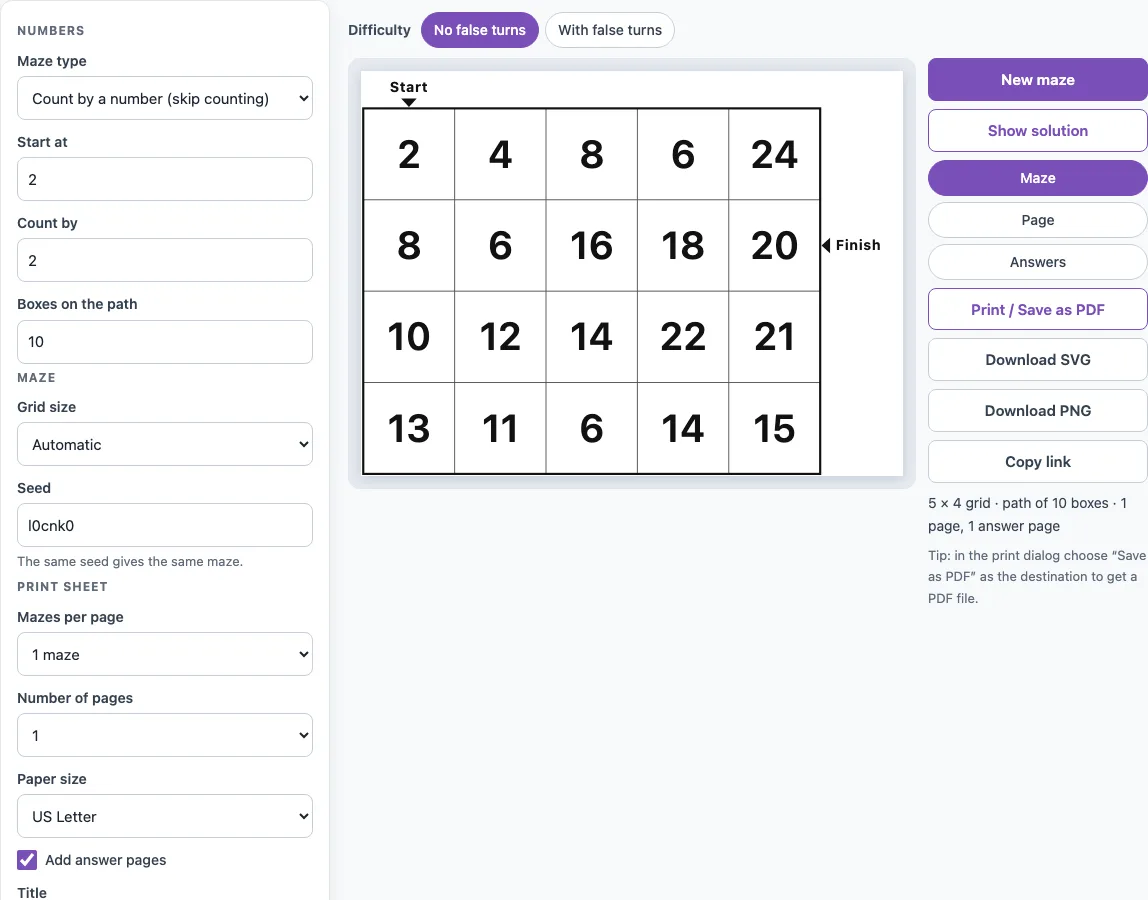
How to use the math maze maker
- Choose a Maze type: Count by a number (skip counting) or Same answer (equations).
- For a skip counting maze, set Start at (0 to 100), Count by (1 to 12) and Boxes on the path (5 to 30).
- For a same-answer maze, set Answer to find (2 to 100), tick the operations you want under Equations use (Addition, Subtraction, Multiplication, Division) and set Boxes on the path. At least one operation always stays on.
- Choose a Difficulty: No false turns or With false turns.
- Under Maze, pick a Grid size: Automatic, or Custom with Columns and Rows from 4 to 20. The Seed field below it is what makes a maze repeatable.
- Use the Maze, Page and Answers buttons above the preview to see the bare puzzle, the printed page and the answer page. Show solution shades the route.
- Press New maze for a different puzzle with the same settings.
- Under Print sheet, set Mazes per page (1 or 2), Number of pages, Paper size (US Letter or A4), Add answer pages, Title, Name and date line and Instruction line.
- Press Print / Save as PDF. In the print dialog, choose Save as PDF as the destination if you want a file.
Download SVG and Download PNG save the maze you are looking at as an image. Copy link shares the exact sheet, and a reprint of the same seed and settings is identical.
What is a math maze?
A math maze is a grid of square boxes, and each box holds a number or an equation. Only one route from Start to Finish follows the rule, and the other boxes are fillers. Start is always the top-left box, and Finish sits on the bottom row or right column, marked with an arrow and the word Finish. You move one box at a time up, down, left or right, never diagonally, and you never use a box twice.
How do I make a skip counting maze?
Set Maze type to Count by a number (skip counting), then choose Start at, Count by and Boxes on the path. The route goes through the start number, then start plus the step, then start plus two steps, and so on in order. With the defaults you get 2, 4, 6 up to 20. Count by 3 from 3 gives 3, 6, 9, 12, and count by 10 from 10 gives 10, 20, 30.
The fillers are whole numbers from 1 up to the larger of 20 and the last path number plus two steps. A filler is never the number just before or after a route box in the sequence, so the next box is always clear. Fillers can be other multiples, so the solver must follow the order rather than just spot multiples.
How does a same-answer math maze work?
In a same-answer maze, every box shows an equation such as 7 + 5, 20 − 8, 3 × 4 or 36 ÷ 3. The route boxes all equal the answer to find. Every other box equals a different number that is between 12 below and 12 above the answer, and never below 2. The solver has to work out each equation to tell the route from the fillers.
The tool builds the equations this way. Addition splits the answer into two whole numbers, so 7 + 5 = 12. Subtraction starts from a bigger number, the answer plus 1 to 30, and takes away the difference, so 20 − 8 = 12. Multiplication uses two factors that are each at least 2, so 3 × 4 = 12. Division uses a divisor from 2 to 9 and a starting number up to 144, so 36 ÷ 3 = 12.
Can I make a multiplication or division maze?
Yes. In Same answer (equations) mode, tick Multiplication (×), Division (÷) or both under Equations use. A multiplication-only maze uses products of two factors that are each at least 2. A division maze uses starting numbers up to 144 divided by a divisor from 2 to 9.
Some answers have limits. A prime answer such as 13 has no multiplication pair, so those boxes use another operation you have ticked, or addition if none is left. Numbers above 72 cannot start a division within 144, so division is skipped for them. For skip counting practice on times tables, use Count by with a number from 1 to 12.
Frequently asked questions
What grade levels is the math maze for?
Skip counting by 2s, 5s and 10s suits early elementary students. Equations using +, −, × and ÷ suit elementary students. You can adjust Count by, Answer to find and the operations to match your child’s or class’s level.
Can I use the same math maze again?
Yes. The seed in the Maze section and the settings decide the puzzle, so the same seed always gives the same maze, answers included. Copy link keeps the seed in the address, so a link reopens the exact sheet. New maze picks a fresh seed.
Is the math maze free?
Yes. It is free, needs no sign-up and nothing to install. It runs in your web browser, and each puzzle is made on your device without anything being uploaded.
Can I print the answers?
Yes. Tick Add answer pages before you print, and the answer pages come after the puzzle pages, with 2 answers per page. The answer page shades the route and draws a red line through it. For same-answer mazes, the equations stay printed so a teacher can check them.
Does the math maze work on a phone or tablet?
Yes. The page fits a phone screen: the maze appears first, the settings stack below it and the buttons are large enough to tap. To print from a phone or tablet, tap Print / Save as PDF and use the device’s print or share menu. Equations stay readable at 375 pixels wide because every box uses the same text size.
Related tools
- Alphabet maze: Use this when you want a maze that practises letters instead of numbers.
- Word maze puzzle maker: Use this to make a maze with words for spelling or vocabulary practice.
- Easy mazes: Use this for simpler routes for younger or newer solvers.
- Maze worksheets: Use this to find printable maze sheets for classroom use.
- Maze generator: Use this to make a standard maze with a path to find.
- Hard mazes: Use this for bigger, more challenging puzzles.
- Maze game online: Use this when you want to play a maze on screen instead of printing it.
- Printable mazes: Use this to browse the full range of printable maze puzzles on this site.