Maze Coloring Pages
Pick a picture, print the maze, solve it and color it in. Thick walls and wide paths suit crayons.
Recent
Your last 10 settings, saved only in this browser. Nothing is uploaded.
Maze coloring pages are printable pictures where the outline of the picture is a maze. This free tool makes them in your web browser, with no sign-up and nothing to install. Each puzzle is made on your device, and nothing is uploaded.
You can choose from twenty pictures, including a butterfly, elephant, cat, owl, whale, horse, dinosaur, heart, apple, house, pumpkin, Christmas tree and rocket. Solve each maze with a pencil from Start to Finish, then color in the picture. Pick a difficulty level, set the print options, and you have maze to color sheets for home or the classroom.
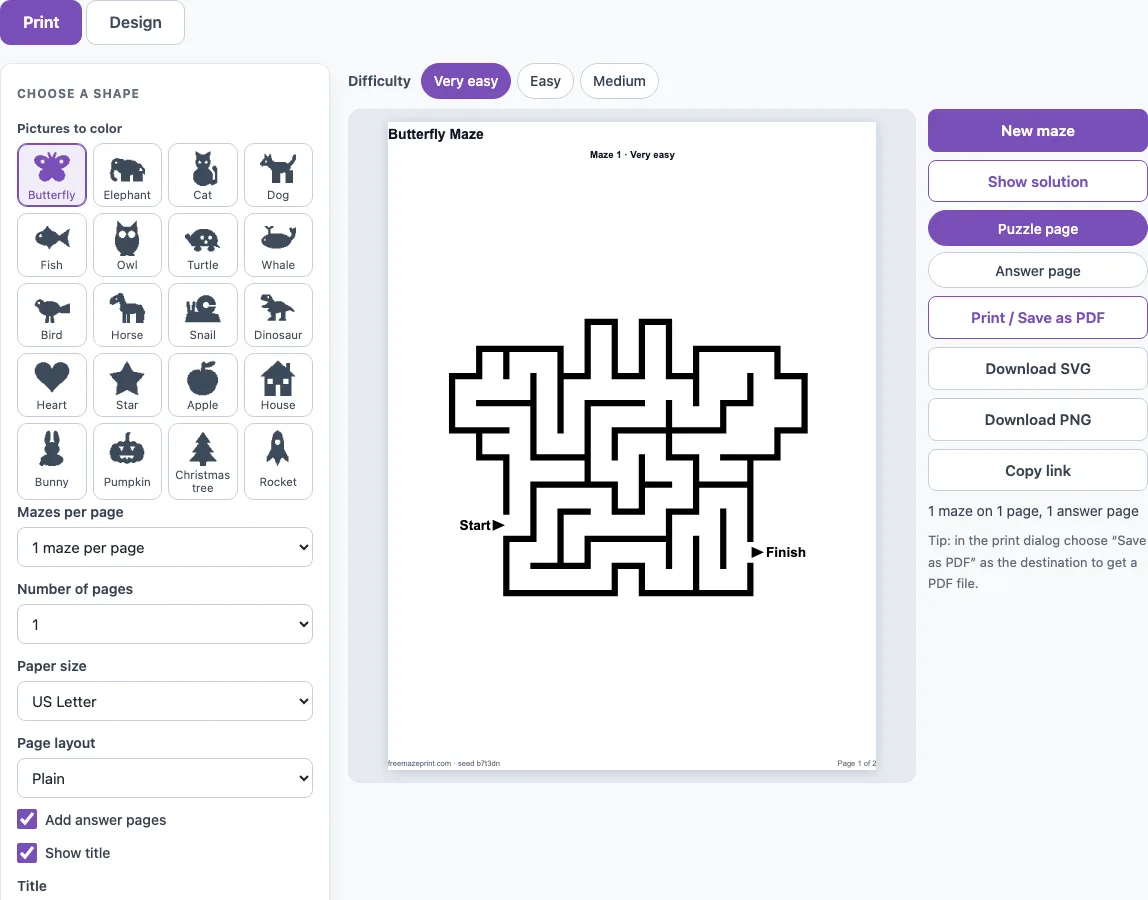
How to use the maze coloring pages tool
- Choose a picture from the shape buttons next to the settings. The page opens on a butterfly.
- Pick a difficulty chip: Very easy, Easy or Medium. The page opens on Very easy.
- Open the Design tab and click More options if you want to change the look. Wall thickness (Thin, Normal or Thick) starts on Thick, Wall colour starts on black, and Kid-friendly (thicker walls, wider paths) starts switched on.
- Press New maze for a different puzzle with the same picture and settings.
- On the Print tab, set Mazes per page (1, 2, 4 or 6), Number of pages (1 to 20), Paper size (US Letter or A4) and Page layout (Plain or Worksheet, which adds a name and date line). Show title, Number the mazes and Start and Finish labels can be switched off for a cleaner coloring page.
- Turn on Add answer pages if you want the solutions.
- Press Print / Save as PDF. In the print dialog, choose Save as PDF as the destination to keep a file.
Download SVG or Download PNG saves the maze as an image. Copy link shares the exact sheet, and a reprint with the same seed and settings is identical. Show solution draws the route in red.
What are maze coloring pages?
Maze coloring pages are printable pictures where the outline of the picture is the outer wall of a maze. The rooms and passages between the walls are the areas you color. You solve the maze first, then color the picture.
The Start and Finish points sit on the outline, at the two points farthest apart along the maze’s own paths. They are marked with arrows and labels, which you can hide with the Start and Finish labels option.
Can I color the maze after solving it, and with what?
Yes. Solve the maze first with a pencil or a light color, so the route is not hidden under darker ink. Then color around the route with crayons, markers or colored pencils. Walls are black by default, so the outline stays clear after coloring.
Plain paper suits crayons and colored pencils. Markers can show through thin paper, so print on heavier paper if you plan to use them. Use 1 maze per page for the largest coloring areas.
Are there easy maze coloring pages for preschoolers?
Yes. Choose Very easy and leave Kid-friendly switched on, which is how the page opens. The picture is 13 cells across, with walls of about 2.4 mm and passages of about 15 mm. A butterfly has about 91 cells and a route of about 40 cells on this level.
The fish is the smallest picture. On Very easy it has about 53 cells and a route of about 25 cells, which makes a short trip for a young solver. Very easy also opens a few extra passages, so there can be more than one way through, which helps when a child gets stuck.
Which pictures can I choose?
There are twenty pictures. Twelve are animals: butterfly, elephant, cat, dog, fish, owl, turtle, whale, bird, horse, snail and dinosaur. Four are everyday shapes: heart, star, apple and house. The last four are a bunny, a pumpkin, a Christmas tree and a rocket. All of them are the site’s own drawings, and each one becomes the outer wall of the maze.
How big are the areas to color?
It depends on the level and on how many mazes you print per page. With one maze per page on US Letter and Kid-friendly on, the passages of a butterfly are about 15 mm wide on Very easy, about 10 mm on Easy and about 7 mm on Medium. The walls are about 2.4 mm, 1.9 mm and 1.4 mm thick with Wall thickness on Thick. Smaller pictures such as the fish have fewer cells, so their passages stay as wide but the route is shorter.
Frequently asked questions
Is it free?
Yes, the tool is free to use. The mazes you make can be used at home, in class, or in products you sell, such as Etsy printables or KDP activity books, and no credit is needed.
Can I print the answers?
Yes. Turn on Add answer pages in the Print tab. The answer pages come after the maze pages, with the solution drawn in red.
Does it work on a phone or tablet?
Yes. The page fits a phone screen: the settings stack above the preview, the preview scales to the screen width and the buttons are large enough to tap. To print from a phone or tablet, tap Print / Save as PDF and use the device’s print or share menu.
Can I print several pictures on one page?
Yes. On the Print tab, Mazes per page offers 1, 2, 4 or 6. Every maze on a page uses the picture you chose, with a different layout each. For a mixed set of pictures, print one picture, pick the next and print again. One maze per page leaves the biggest areas to color.
Can I change the wall color or thickness?
Yes. Under More options on the Design tab, Wall thickness offers Thin, Normal and Thick, and Wall colour is black by default but can be any colour. Thick walls and a dark colour make the outline easier to stay inside while coloring.
Related tools
- Dinosaur and animal mazes: Use these when your child likes creatures and wants more pictures to solve and color.
- Easy mazes: Use these for simple routes when you want a quick warm-up before a longer maze.
- Maze worksheets: Use these for printed practice sheets in a classroom or homework setting.
- Fall and Thanksgiving mazes: Use these for autumn-themed pages to print for the season.
- Christmas mazes: Use these for festive December pages, such as a Christmas tree maze.
- Halloween mazes: Use these for spooky-themed pages to print before October.
- Maze generator: Use this when you want to build a plain maze with your own settings.
- Printable mazes: Use this to browse the full range of printable maze pages on the site.