Medium Maze Printables
Medium difficulty mazes for kids and adults: not too short, not too tricky. Print them with answer pages.
Recent
Your last 10 settings, saved only in this browser. Nothing is uploaded.
A medium maze is a rectangular maze of 18 x 18 cells with one route from Start to Finish and no extra openings. This page creates them for free in your web browser, with no sign-up and nothing to install. Each puzzle is made on your device, and nothing is uploaded.
The page opens on Medium, so you can start printing right away. Each maze is built from a seed, which means you can return to the exact same puzzle later or share it with someone else. A medium maze suits older primary school children, classroom activities, and adults who want a puzzle that takes more effort than an easy maze but is not as long as a hard one.
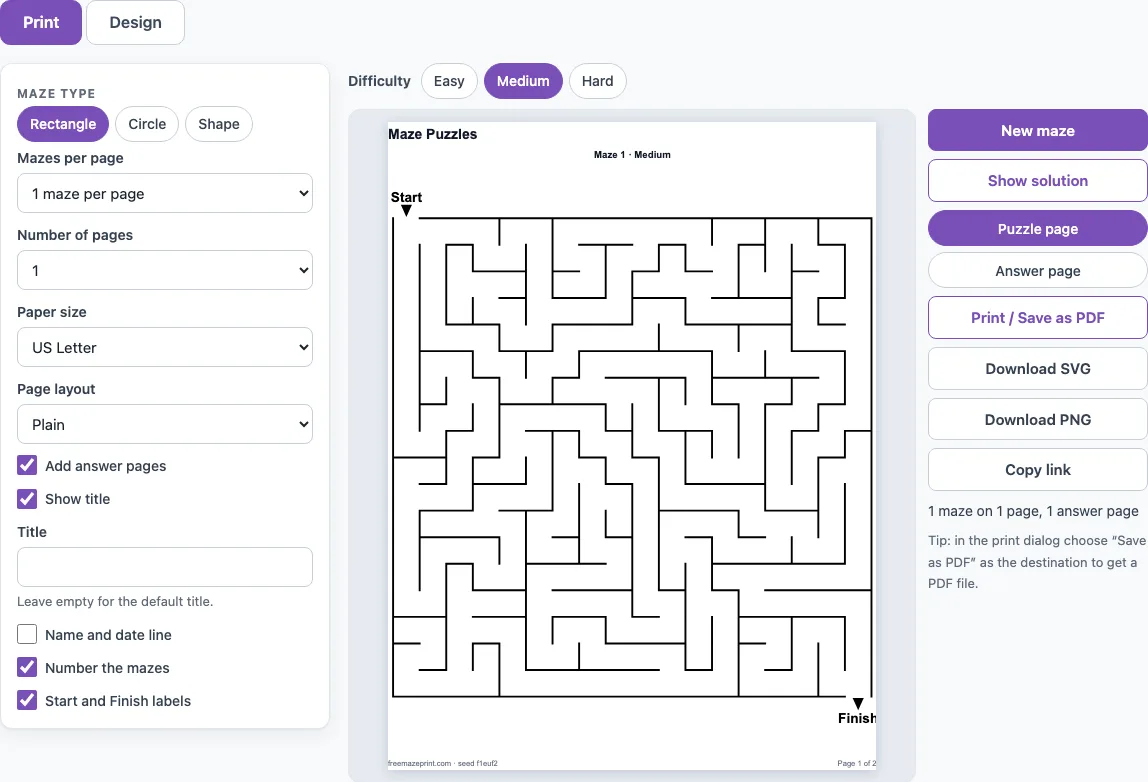
How to use the medium maze generator
- Check that the difficulty chip is set to Medium. The page opens on Medium by default, and the chips for Easy and Hard sit alongside it.
- Look at the Seed field. Each seed produces one specific maze, so the same seed and settings always give the same puzzle.
- Select New maze to get a different puzzle with the same settings.
- Open the Design tab and, under More options, tick Kid-friendly (thicker walls, wider paths) if the solver is young. This uses about 20 % fewer cells for the same difficulty and makes the walls easier to follow with a crayon.
- Change the Title field if you want a different heading.
- Open the Print tab and choose your layout: the number of mazes per page, the number of pages, the paper size, and whether to use the Worksheet or Plain page layout.
- Select Print / Save as PDF. In the browser print dialog, choose “Save as PDF” as the destination if you want a file.
Use Copy link to share the exact sheet, which means a reprint will look identical. Download SVG and Download PNG save the maze as an image for use in other documents.
The page address keeps your settings, so Copy link reopens the same difficulty for anyone you send it to.
What does medium difficulty mean for a maze?
Medium difficulty means the maze is built on an 18 x 18 grid and has exactly one route from Start to Finish. The site builds Medium mazes with the backtracker algorithm and adds no extra openings, so there is only one way through.
On average, a Medium maze has a route of about 104 cells and 34 dead ends, measured on the site’s generator over 20 mazes. A dead end is a passage that stops, and every one you enter costs time, because you must walk back out before trying another path. The site scores difficulty from 0 to 100, based on choice points on the solution path, turns and dead ends. Across 50 seeds, Medium averages 53, which sits between Easy at 38 and Hard at 66. Easy mazes open a few extra passages, so there is more than one way to reach the Finish.
Who are medium mazes for?
Medium mazes are for children who have outgrown easy mazes, usually around older primary school age. They also work well as a classroom activity sheet, because students can work through the same level at their own pace. Adults who want a quick puzzle for a break will find them a good fit too.
Because a Medium maze has one route and a moderate number of dead ends, it asks for patience without becoming a long task. For a child who gets stuck quickly, Easy or a Kid-friendly Easy maze is a better starting point.
How big is a medium maze?
A medium maze is 18 x 18 cells, which makes 324 cells in total. For comparison, Easy is 10 x 10 and Hard is 30 x 30. The average route through a Medium maze is about 104 cells long.
The number of cells does not change when you adjust the print settings. Choosing more mazes per page makes each maze appear smaller on paper, but the grid stays at 18 x 18. Turning on Kid-friendly reduces the cell count by about 20 % for the same difficulty, so the paths are wider and the maze is easier to draw on.
Frequently asked questions
Can I see the solution to a medium maze?
Yes. Select Show solution to draw the route in red on the page. On the Print tab, tick Add answer pages to place solution pages after the maze pages, with the route shown in red.
Can I make a set of medium mazes for a class?
Yes. Set Mazes per page to 1, 2, 4 or 6, and set Number of pages from 1 to 20. Each maze in the set gets its own seed, so every student receives a different puzzle. Choose the Worksheet page layout to add a name and date line and the instruction “Find the way from Start to Finish.”
Can I make a medium maze in a different shape?
This page makes rectangular mazes only. If you want a round maze, the circular maze generator uses 12 rings at Medium difficulty.
Is a medium maze too hard for a young child?
It can be, depending on the child. Turn on Kid-friendly to get thicker walls and wider paths, or choose Easy if the child finds the Medium route difficult to follow.
Does it work on a phone or tablet?
Yes. The settings stack above the preview and the preview scales to the screen width. To print from a phone or tablet, tap Print / Save as PDF and use the device’s print or share menu.
Related tools
- Easy mazes: Use these for younger children or for a quicker puzzle with more than one route.
- Hard mazes: Choose these when a solver wants a longer, more demanding route with many more dead ends.
- Printable mazes: Go here to browse all the printable maze options on the site.
- Maze generator: Use this to create mazes with custom settings beyond the standard difficulty levels.
- Maze worksheets: Choose this when you want mazes laid out as a classroom or homework sheet.
- Circular maze generator: Use this when you want a round maze instead of a rectangular one.
- Maze game online: Try this if you want to solve a maze on screen rather than on paper.
- Maze solver: Use this to check a route through a maze you are stuck on.