Spring Maze Printables
Mazes shaped like a flower, a butterfly, an umbrella and more. Pick a shape and a level, then print.
Recent
Your last 10 settings, saved only in this browser. Nothing is uploaded.
This spring maze tool makes printable mazes shaped like spring pictures, such as a flower, a butterfly or a bird. It runs in your web browser, is free, and needs no sign-up or installation. Each maze is made on your device, and nothing is uploaded.
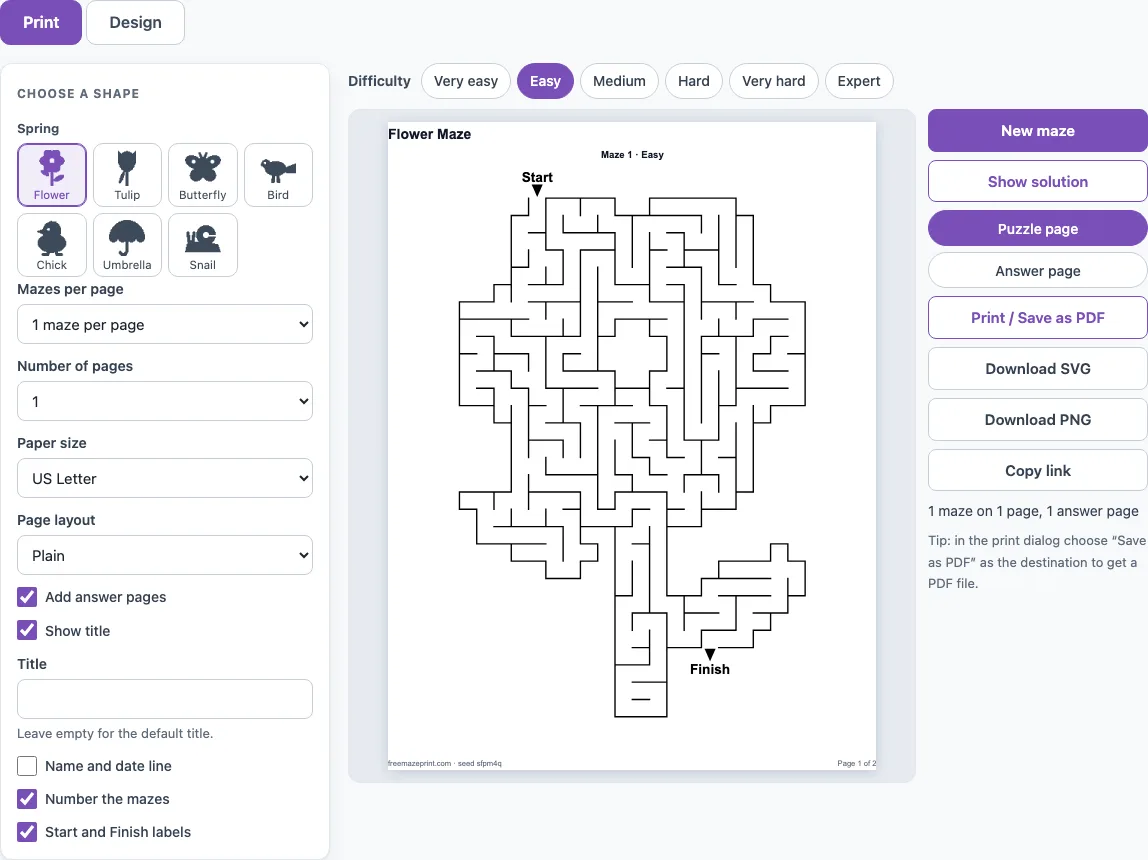
The page opens on a flower maze at Easy difficulty, with one maze per page. You can switch to another spring shape, change how detailed the maze is, and then print it or save it as a PDF or image. The outer wall follows the outline of the picture, so the paths fill the shape from the Start point to the Finish point.
How to use the spring maze tool
- Pick a spring shape with the shape buttons next to the settings. The Spring group includes flower, tulip, butterfly, bird, chick, umbrella and snail.
- Choose a difficulty: Very easy, Easy, Medium, Hard, Very hard or Expert. Higher levels make more detail and a longer route.
- On the Design tab, open More options and turn on Kid-friendly (thicker walls, wider paths) if the maze is for a young child.
- Look at the maze. The Start and Finish points are placed on the outline for you.
- Click New maze if you want a different puzzle with the same settings.
- Click Show solution to draw the route in red, so you can check your answer.
- Open the Print tab and set Mazes per page, Number of pages, Paper size and Page layout.
- Click Print / Save as PDF. In the browser print dialog, choose Save as PDF as the destination. You can also use Download SVG or Download PNG to save the maze as an image.
Click Copy link to share the exact sheet. Other shape groups, such as animals and holidays, are under More shapes on the Design tab.
The page address keeps your settings, so Copy link reopens the same shape and difficulty for anyone you send it to.
Which spring shapes are there?
There are seven spring shapes on this page: flower, tulip, butterfly, bird, chick, umbrella and snail. The flower is a daisy with a stem and two leaves, and the flower and umbrella were drawn for this site, while the chick and tulip are shared with the Easter page.
The shapes differ in size, which changes the route length. At Very easy, the bird is the smallest, with a route of about 43 cells, while the tulip is the longest at about 73. The flower’s route is about 69 cells at Very easy and about 139 at Easy.
Are there easy spring mazes for preschoolers?
Yes. Start with Very easy and the bird, which has the shortest route of the spring shapes. Turn on Kid-friendly, which uses about 20 % fewer cells for the same difficulty and draws thicker walls and wider paths, so a child can trace the route with a crayon.
Print one maze per page so the picture has more room. Leave the Worksheet layout off if you want a plain sheet without the name and date line.
How can I use spring mazes in a classroom?
Print a set of mazes for a group. Set Mazes per page to 2, 4 or 6, choose the number of pages you need, and turn on Number the mazes so students can refer to them. Each maze in a set gets its own seed, so every student gets a different puzzle.
Use the Worksheet page layout to add a name and date line and the instruction “Find the way from Start to Finish.” Turn on Add answer pages so the solutions appear after the maze pages, shown in red. For a class that is ready for more challenge, raise the difficulty one step at a time.
The other spring shapes sit in the same range. At Very easy the butterfly has a route of about 60 cells, the snail about 56, the umbrella about 56 and the chick about 66. At Easy the numbers roughly double: butterfly about 107, snail about 122, umbrella about 124 and chick about 143.
Frequently asked questions
Is this spring maze tool free to use?
Yes. It is free, needs no sign-up and runs in your browser. Mazes are made on your device, and nothing is uploaded.
Can I save a spring maze as a PDF?
Yes. Click Print / Save as PDF, then choose Save as PDF as the destination in the browser print dialog.
How do I get a different spring maze with the same settings?
Click New maze. The shape, difficulty and other settings stay the same, but the puzzle changes.
Where are the Start and Finish points?
They are placed on the outline of the picture, at the two points that are farthest apart along the maze’s paths. You do not need to place them yourself.
Can I sell the spring mazes I make?
Yes. The shape outlines are our own drawings, and every maze you make is royalty-free for personal, classroom and commercial use, including Etsy printables, Teachers Pay Teachers and KDP books. No credit is required, and the only thing you may not do is copy the generator itself to run a competing service.
Does it work on a phone or tablet?
Yes. The page fits a phone screen: the settings stack above the preview, the preview scales to the screen width and the buttons are large enough to tap. To print from a phone or tablet, tap Print / Save as PDF and use the device’s print or share menu.
Can I print more than one maze on a page?
Yes. On the Print tab, set Mazes per page to 1, 2, 4 or 6 and Number of pages from 1 to 20. Each maze in the set gets its own seed, so the puzzles on a sheet are all different.
Related tools
- Easter mazes: Use these for spring and Easter pictures that share the chick and tulip shapes.
- Maze worksheets: Choose these when you want a printed sheet for a lesson or homework.
- Easy mazes: Pick these for a quick, simple puzzle for beginners.
- Maze coloring pages: Use these when a child wants to color a picture after solving the maze.
- Animal mazes: Try these for dinosaur and animal shapes.
- Printable mazes: Go here to browse all the maze types on the site.