Thanksgiving Maze Printables
Mazes shaped like a turkey, a pumpkin, an acorn and more. Pick a shape and a level, then print.
Recent
Your last 10 settings, saved only in this browser. Nothing is uploaded.
This free Thanksgiving maze generator makes printable mazes in the shape of a turkey, leaf, pumpkin, pilgrim hat, acorn or apple. It runs in your web browser, so there is nothing to install and no sign-up. Each puzzle is made on your device, and nothing is uploaded.
Use it to find a free printable Thanksgiving maze for a classroom, a kids’ table or a quiet afternoon. You choose the shape and the difficulty, from Very easy for small hands to Expert for experienced solvers. Then print the sheet, save it as a PDF, or download it as an image.
Every maze starts from a seed, so you can rebuild the same puzzle later. The page opens on a turkey maze at Easy difficulty, one per page, and you can change any of that before you print.
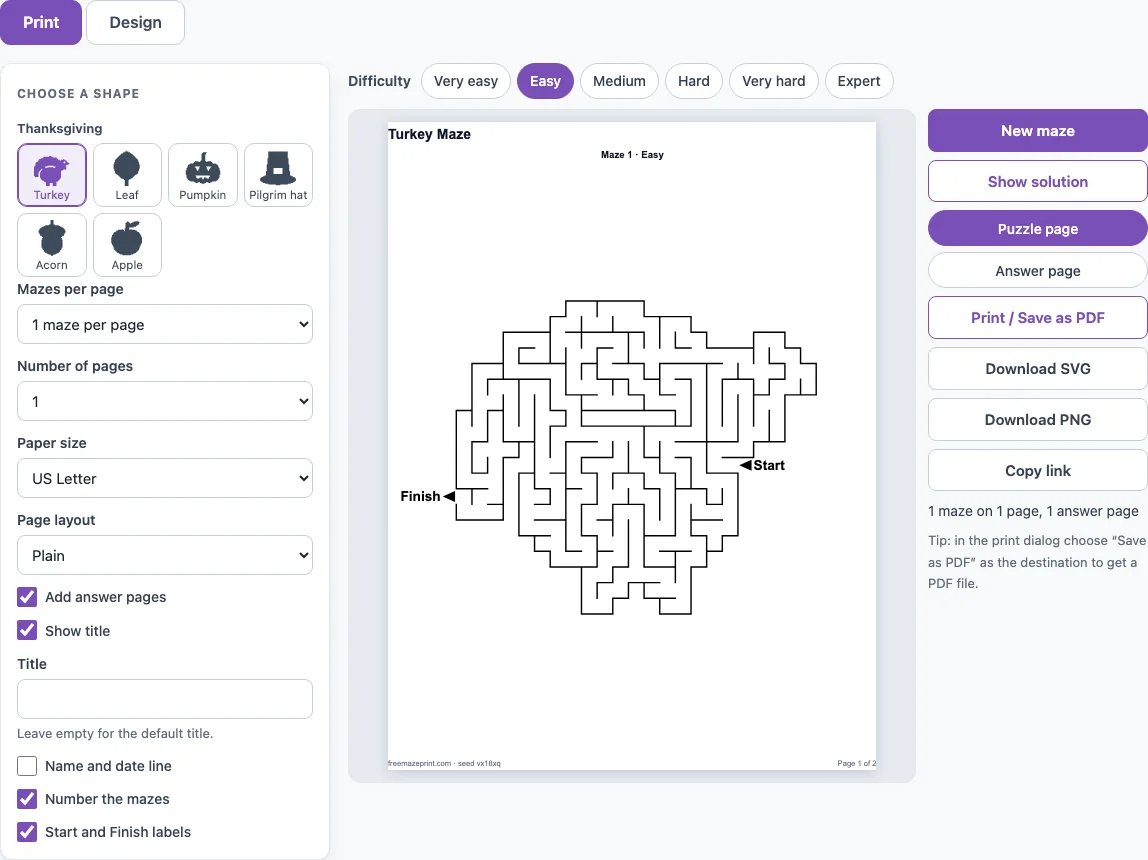
How to use the Thanksgiving Maze Generator
- The page opens on a turkey maze. To pick another shape from the Thanksgiving group, click one of the shape buttons beside the settings.
- Choose a difficulty from Very easy to Expert. Higher levels draw more cells and longer routes.
- For young children, tick ‘Kid-friendly (thicker walls, wider paths)’ under More options.
- Change the Title field if you want a name other than the default, such as ‘Turkey Maze’.
- Open the Print tab. Set ‘Mazes per page’, ‘Number of pages’, and ‘Paper size’ (US Letter or A4).
- Turn on ‘Add answer pages’ if you want a solution sheet after the maze pages.
- Pick a ‘Page layout’: Plain, or Worksheet for a name and date line.
- Click ‘Print / Save as PDF’ and choose Save as PDF as the destination. You can also click ‘Download SVG’ or ‘Download PNG’.
Click ‘New maze’ if you want a different puzzle with the same settings. To share the exact sheet, click ‘Copy link’. A reprint with the same seed and settings is identical, so you can print it again without changes. Use ‘Show solution’ to draw the route in red before you print.
The page address keeps your settings, so Copy link reopens the same shape and difficulty for anyone you send it to.
How do I make a printable Thanksgiving maze?
Pick a shape, a difficulty and your print settings, and the tool builds a full maze that fills the picture outline. The puzzle comes from a seed, so the same settings always return the same maze.
In a shape maze, the maze fills the picture, and the outer wall follows the outline. The Start and Finish are placed on the outline at the two points that are farthest apart along the maze’s paths. That means the route crosses the whole picture, not just one corner.
Difficulty sets the detail. It controls how many cells fit across the picture: Very easy uses 16, Easy 24, Medium 32, Hard 44, Very hard 56 and Expert 70. More cells make a longer route, more dead ends and a smoother outline. Very easy and Easy also open a few extra passages, so there is more than one way through.
Which Thanksgiving shapes are there?
There are six Thanksgiving shapes: turkey, leaf, pumpkin, pilgrim hat, acorn and apple. They sit together in the Thanksgiving shape group. The pilgrim hat and acorn are drawn for this page. The other four are shared with other shape pages on the site.
Shapes differ in how much route they hold. Measured on the generator as an average of 20 mazes, the Easy route is about 97 cells for the pumpkin, 114 for the turkey, 129 for the leaf, 135 for the pilgrim hat, 156 for the apple and 163 for the acorn. The acorn is the biggest shape, and at Very easy it has a route of about 82 cells across 210 cells in the shape. A Very easy turkey has about 50 cells of route in a 127-cell shape.
The pilgrim hat has a small hole where the buckle is. That part is solid, so the route goes around it rather than through it. Other shapes, such as animals and holidays, are under ‘More shapes’ on the Design tab.
Frequently asked questions
Are there easy Thanksgiving mazes for young children?
Yes. Choose Very easy difficulty, then tick ‘Kid-friendly (thicker walls, wider paths)’ under More options. That setting uses about 20 % fewer cells for the same difficulty and thicker walls, so a child can draw the route with a crayon.
How can I use a Thanksgiving maze at a class party or family dinner?
Set ‘Mazes per page’ to 4 or 6 so each sheet holds several puzzles, and use the Worksheet layout for a name and date line. Turn on ‘Add answer pages’ so you can check the answers without searching for them. Each maze in a printed set gets its own seed, so the puzzles on one sheet are all different.
Can I sell Thanksgiving mazes I make?
Yes. The shape outlines are our own drawings, and every maze you make is royalty-free for personal, classroom and commercial use, including Etsy printables, Teachers Pay Teachers and KDP books. No credit is required, and the only thing you may not do is copy the generator itself to run a competing service.
Do I need to create an account to print a free Thanksgiving maze?
No. The tool is free, requires no sign-up and nothing to install. Your puzzles are made on your device and nothing is uploaded.
How do I get the same Thanksgiving maze again?
Keep the seed shown in the Seed field, or click ‘Copy link’ to save the exact sheet. A reprint with the same seed and settings is identical. Click ‘New maze’ only when you want a different puzzle.
Related tools
- Holiday mazes: Use this for other fall and Thanksgiving mazes beyond this page.
- Halloween mazes: Use this when you want pumpkin, bat or ghost mazes for October.
- Christmas mazes: Use this for winter holiday mazes after Thanksgiving.
- Easy mazes: Use this for simpler puzzles for young solvers.
- Maze worksheets: Use this when you need mazes laid out for a classroom or homework sheet.
- Maze coloring pages: Use this for a maze that pairs with colouring.
- Dinosaur and animal mazes: Use this for animal-themed mazes for children.
- Printable mazes: Use this to browse the full set of maze types on the site.