Winter Maze Printables
Mazes shaped like a snowflake, a snowman, a winter hat and more. Pick a shape and a level, then print.
Recent
Your last 10 settings, saved only in this browser. Nothing is uploaded.
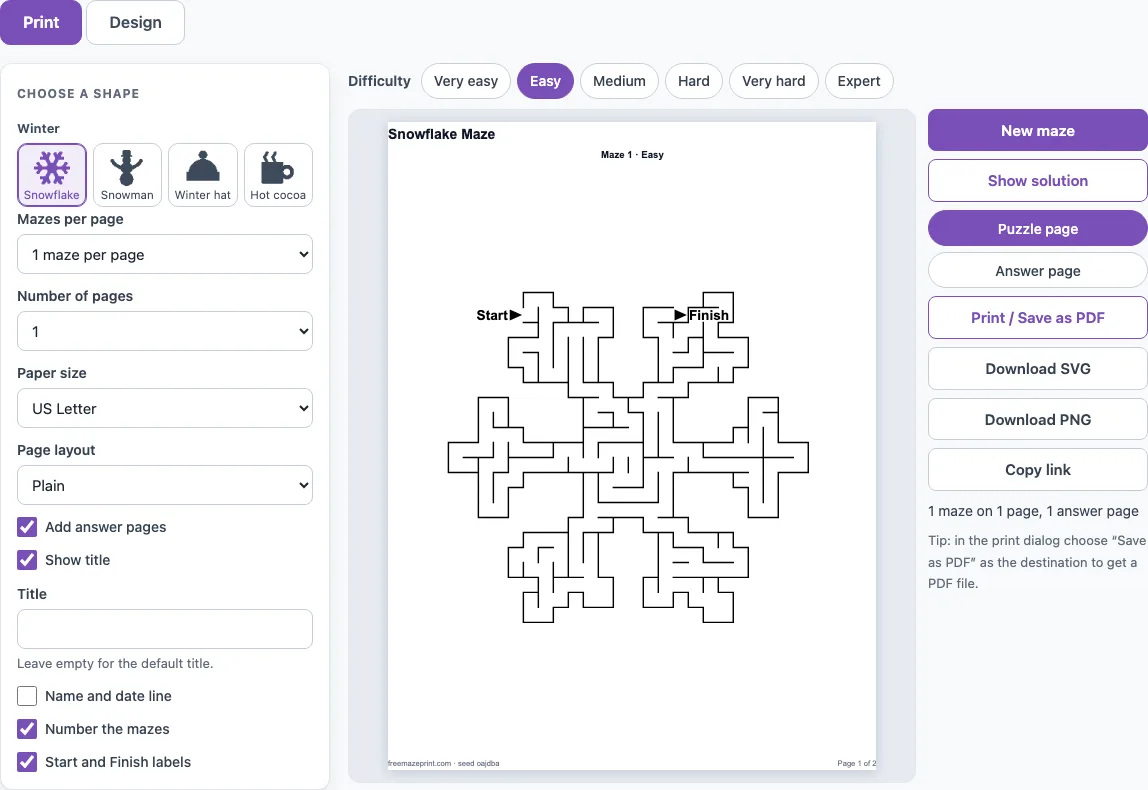
How to use the Winter Maze Tool
- Click a shape button in the Winter group: snowflake, snowman, winter hat or hot cocoa mug. The shape buttons sit next to the settings.
- Choose a difficulty: Very easy, Easy, Medium, Hard, Very hard or Expert.
- For young children, open More options on the Design tab and tick Kid-friendly (thicker walls, wider paths).
- Type a title in the Title field if you want one. The default is the shape name followed by “Maze”.
- Click New maze to get a different puzzle with the same settings.
- Open the Print tab and set Mazes per page (1, 2, 4 or 6), Number of pages (1 to 20) and Paper size (US Letter or A4).
- Turn on the options you need: Add answer pages, Show title, Number the mazes, Start and Finish labels, or Page layout set to Worksheet.
- Click Print / Save as PDF. In the browser print dialog, choose Save as PDF as the destination.
Click Show solution to draw the route in red before you print. Download SVG and Download PNG save the maze as an image. The Seed field holds the number that builds each puzzle, so the same seed and settings always give the same maze, and Copy link shares the exact sheet. Each maze in a printed set gets its own seed, and Copy link shares that exact set.
Which winter shapes are there?
There are four winter shapes: the snowflake, the snowman, the winter hat and the hot cocoa mug. The snowflake has six arms with side branches and is the smallest and most open of the four. The winter hat is a knitted hat with a pompom, and the hot cocoa mug has steam above it and a handle with a round hole in it. That hole is solid, so the route goes around it.
Averaged over 20 mazes at Very easy, the route is about 36 cells for the snowflake, 47 for the snowman, 54 for the winter hat and 51 for the hot cocoa mug. The snowflake has the shortest route at every difficulty level, so it is a good first shape to try, and the hot cocoa mug is a friendly second choice.
Are there easy winter mazes for young children?
Yes. Choose Very easy, which uses 16 cells across the picture, and turn on Kid-friendly. Kid-friendly uses about 20 % fewer cells for the same difficulty and thicker walls with wider paths, so a child can trace the route with a crayon. Very easy and Easy also open a few extra passages, so there is more than one way through. That helps when a child reaches a dead end and needs another route.
Is there a non-Christmas winter maze?
Yes. The snowflake, winter hat and hot cocoa mug are drawn for this page and are not Christmas shapes. The snowman is shared with the Christmas page, so it appears in both places. Christmas shapes are on the Christmas mazes page.
Higher difficulties make the route much longer. At Hard, the snowflake has a route of about 233 cells, the snowman about 328, the hot cocoa mug about 406 and the winter hat about 435. The snowflake also has the fewest cells in total, about 804 at Hard, against about 960 for the winter hat.
Frequently asked questions
Is there a free winter maze I can print?
Yes. The tool is free and needs no sign-up. Choose a shape, set the print options and click Print / Save as PDF.
Do I need to install anything to make a winter maze?
No. The tool runs in your web browser, and each puzzle is made on your device, so nothing is uploaded.
Will I get the same winter maze if I print it again?
Yes. The same seed and settings always give the same puzzle, so a reprint is identical. Click New maze if you want a different one with the same settings.
How do I print a winter maze with an answer key?
Open the Print tab and turn on Add answer pages. The answer pages come after the maze pages and show the solution in red.
Can I sell the winter mazes I make?
Yes. The shape outlines are our own drawings, and every maze you make is royalty-free for personal, classroom and commercial use, including Etsy printables, Teachers Pay Teachers and KDP books. No credit is required, and the only thing you may not do is copy the generator itself to run a competing service.
Does it work on a phone or tablet?
Yes. The page fits a phone screen: the settings stack above the preview, the preview scales to the screen width and the buttons are large enough to tap. To print from a phone or tablet, tap Print / Save as PDF and use the device’s print or share menu.
Can I print more than one maze on a page?
Yes. On the Print tab, set Mazes per page to 1, 2, 4 or 6 and Number of pages from 1 to 20. Each maze in the set gets its own seed, so the puzzles on a sheet are all different.
Related tools
- Christmas mazes: use this when you want holiday-themed shapes for the Christmas season.
- Fall and Thanksgiving mazes: use this for autumn and harvest-season puzzles.
- Easy mazes: use this when you want simple puzzles for beginners of any age.
- Hard mazes: use this when a maze needs more dead ends and a longer route.
- Space mazes: use this for puzzles in the shape of space-themed pictures.
- Maze worksheets: use this when you need mazes laid out for classroom or homework use.
- Maze coloring pages: use this when you want a maze to colour in as well as solve.
- Printable mazes: use this to browse every shape and option on the site.